How Smart CFOs Manage Cashflow Without Spreadsheets
A step-by-step guide to connecting invoices, transactions, and forecasts into one living cashflow view
It's Thursday afternoon. A supplier is chasing payment, your CFO is juggling three browser tabs — the bank feed, an invoice spreadsheet, and a cash forecast from February that's already wrong. You know how much you invoiced. You have no idea how much actually landed. The gap between "money you expect" and "money you have" is where businesses get hurt.
Most teams track invoices. Most teams track bank transactions. Almost nobody connects the two — and that's the blind spot.
This article walks through five real scenarios a CFO faces weekly, showing how each one gets solved when invoices, transactions, and projections live in one connected system. Whether you're evaluating BinarBase or already using it, this is your playbook for cashflow that actually works.
1. "Where's My Money?" — Seeing Your Real Cash Position
You check your bank balance Monday morning. It says $84,000. But you have $35,000 in payroll on Friday, $12,000 rent on the 1st, and two client invoices you're still waiting on. Your actual position is nothing like $84,000.
Spreadsheet forecasts go stale the day you build them. And yet, 43% of organizations still rely on spreadsheets for cash forecasting. That's not a process — it's a liability.
A connected cashflow system works differently. It organizes your cash into three zones:
- Historical — actual bank data, what really happened
- Gap carry-forward — the bridge between your last known balance and today
- Future projections — accumulated from planned income and expenses
Here's how it looks in practice:
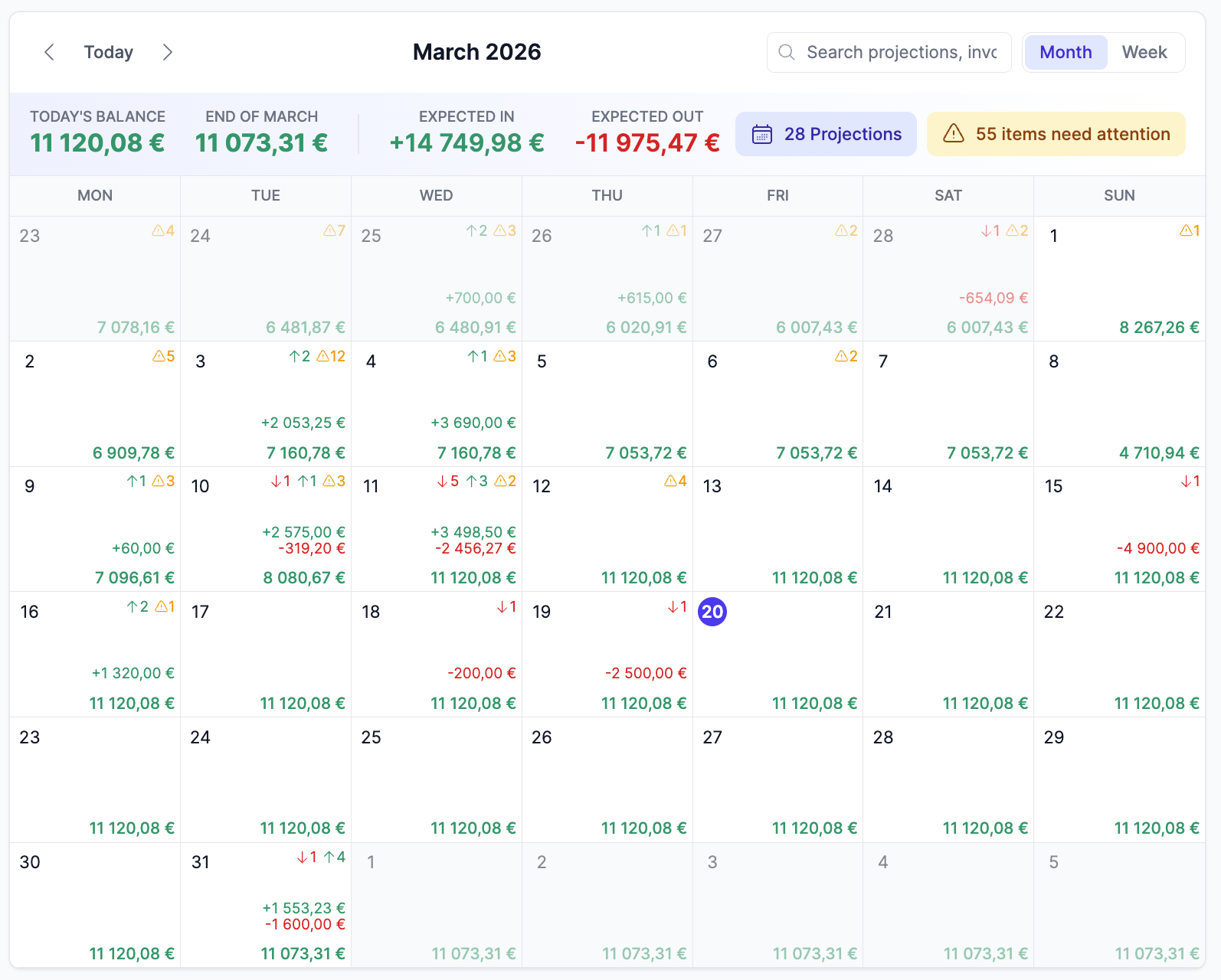
- Open the calendar view — each day shows your running balance, color-coded with green for income and red for expenses
- Today's cell shows your actual balance pulled from your bank feed
- Future dates show projected balances based on every planned payment and expected receivable
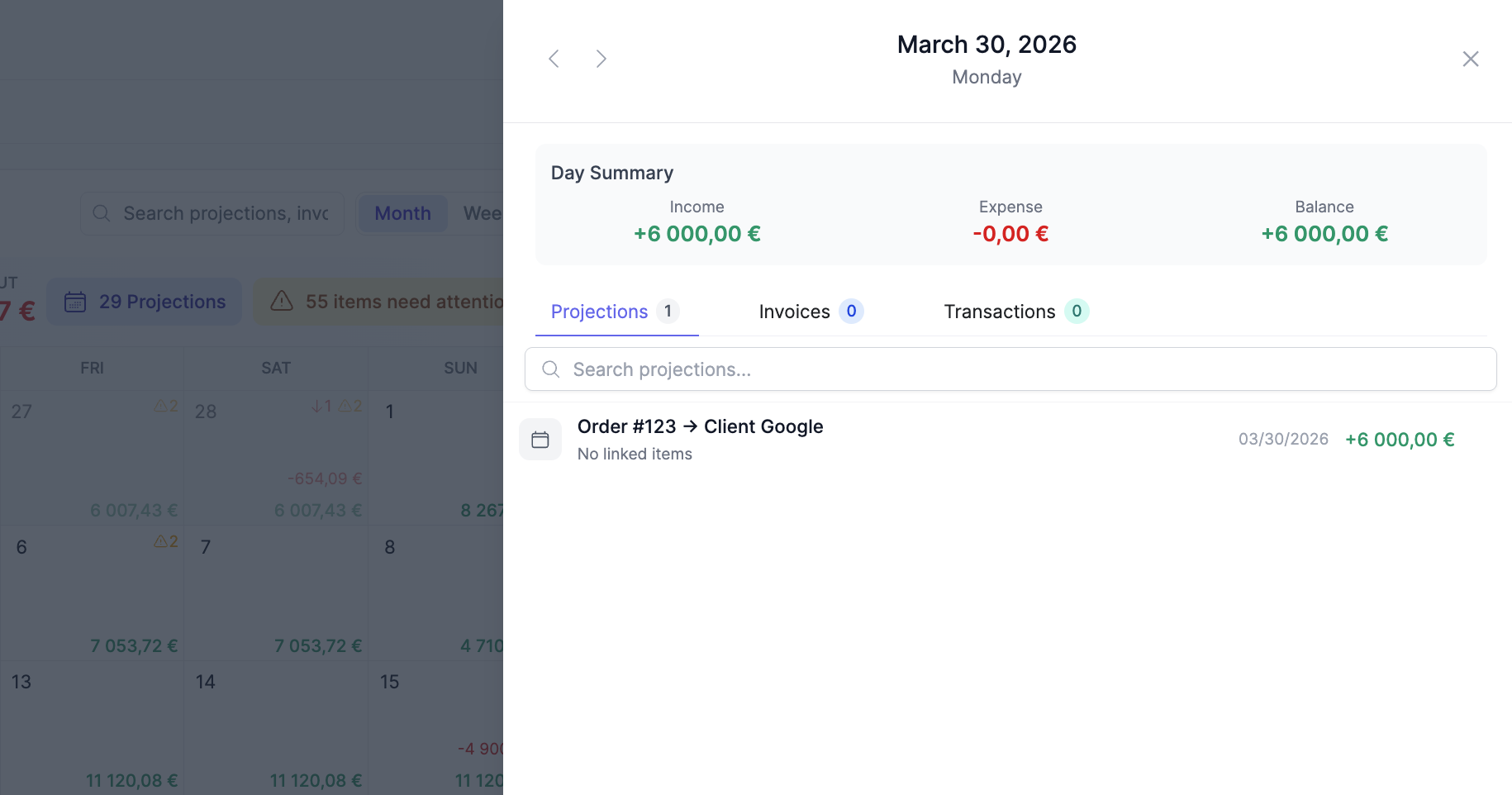
- Click any day to see the full breakdown — balance, income count and total, expense count and total — in a detail panel
Your opening balance can be set from a balance history query or a simple static value. Either way, the calendar builds forward from reality, not from a guess.
"Cash in the bank is not cash available. A forward-looking cash position — actual balance minus committed outflows plus expected inflows — is the only number that matters."
ML-based forecasting tools improve accuracy 30-50% over manual methods. But you don't need machine learning to beat a spreadsheet. You just need a view that updates itself.
2. "Was This Invoice Paid?" — Connecting Invoices to Bank Transactions
Your accountant confirms the invoice was sent. Your bank shows a payment came in. But are they the same thing? You're matching by amount and date in your head — or worse, in a spreadsheet with VLOOKUP. When you have 50+ invoices per month, this breaks down fast.
The core problem is that most tools treat invoices, bank transactions, and forecasts as three separate worlds. BinarBase treats them as three data sources that belong together:
- Projections — your plan (what you expect to happen)
- Invoices — what you billed (or were billed)
- Transactions — what the bank shows (what actually moved)
Each projection can link to multiple invoices and multiple transactions. When you link them, the projection shows attachment info — "2 invoices linked" with a checkmark, "1 transaction linked (+$200 remaining)" — so you always know where you stand.
Here's a typical walkthrough:
- Create a projection: "Q1 Client Payment — $15,000 income, due March 15"
- An invoice arrives from your billing system — it shows up as "unplanned" in the Invoices tab
- Click the invoice, select "Link to Projection," and connect it to the Q1 Client Payment
- When the client pays, the bank transaction appears in the Transactions tab — link it to the same projection
- The projection now shows: invoice linked (checkmark), transaction linked (checkmark) — fully reconciled
"Invoice-to-cash reconciliation shouldn't happen at month-end. When every invoice is connected to a projection and every payment is matched in real time, you catch gaps the day they appear — not 30 days later."
Best-in-class AP teams with automation process invoices in 3.1 days versus 17.4 days for manual teams — that's 82% faster. The invoice-to-cash pipeline is the number one area CFOs are automating in 2026. And it starts with connecting what you planned, what you billed, and what actually arrived.
3. "Set It and Forget It" — Recurring Costs That Track Themselves
Rent. Payroll. SaaS subscriptions. Insurance. You know they're coming every month, but they live in your head or a spreadsheet row you copy-paste forward. When a subscription price changes, you forget to update the forecast. By Q3, your projections are fiction.
Recurring costs shouldn't require recurring effort. In BinarBase, you create one projection and let the system handle the rest with series projections:
- Create a projection — say, "Office Rent — $5,000 expense, monthly"
- Enable "Split into Multiple" and set the frequency (weekly, monthly, etc.) and count
- Preview shows every occurrence: Apr 1, May 1, Jun 1... through Mar next year
- Save — 12 projections appear on the calendar, one per month, all sharing a series ID
The real power is in scope-based editing. When something changes — and it always does — you choose how far the change reaches:
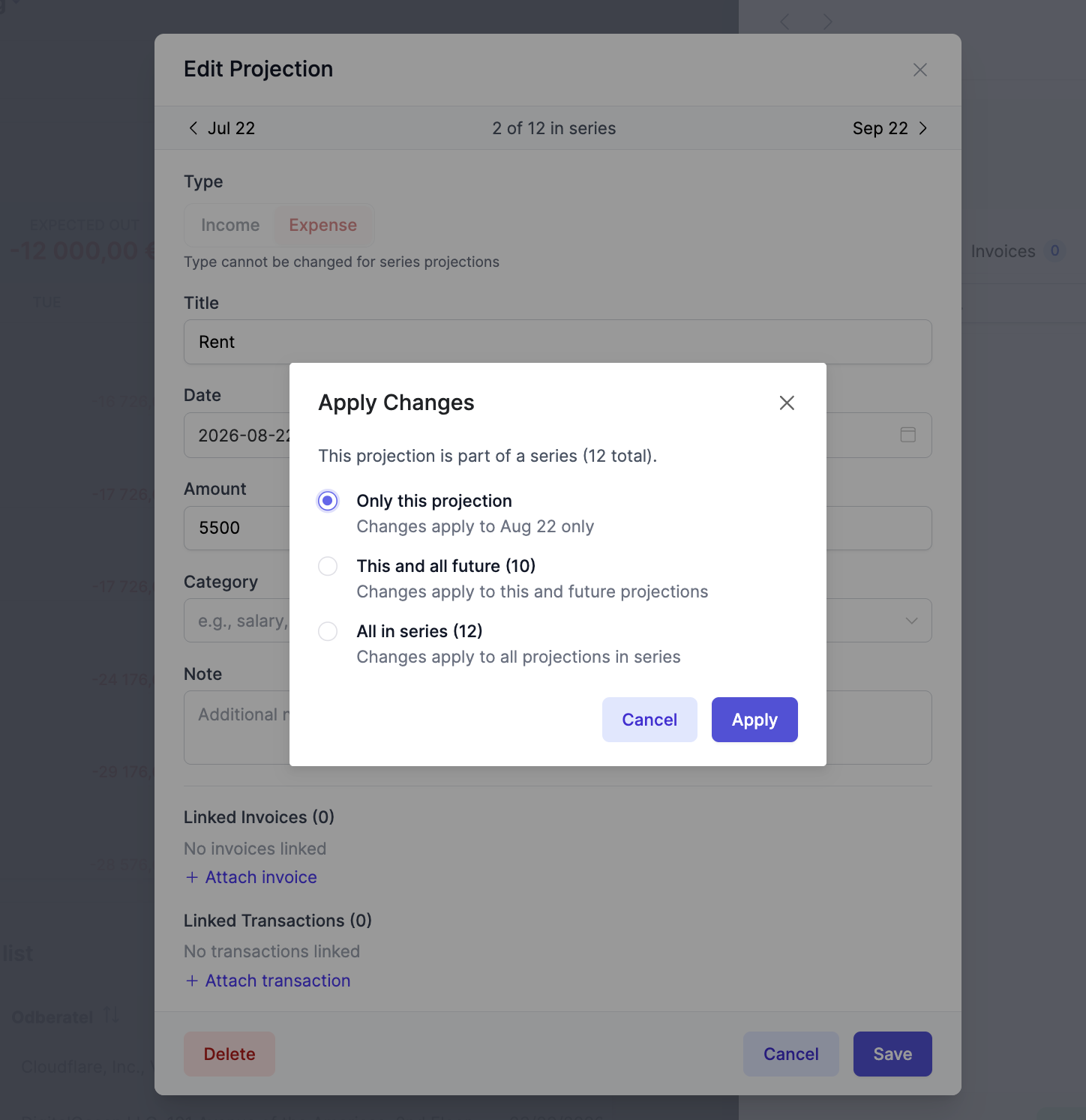
- "This" — edit only this one occurrence
- "Future" — apply to this and all future occurrences
- "All" — apply to every occurrence in the series
Rent increases in July? Edit the July entry, change to $5,500, apply to "Future." July through March all update to $5,500. January through June stay at $5,000. The series navigator shows "Position 7 of 12" with prev/next buttons, so you always know where you are.
"The best cash forecast is one that maintains itself. Recurring projections with scope-based editing mean your forecast stays accurate with minimal maintenance — you only touch what actually changed."
4. "Match 200 Transactions in 2 Minutes" — AI-Powered Auto-Matching
End of month. You have 200 bank transactions and 85 invoices. Matching them manually takes your finance team an entire afternoon. Some are obvious — exact amount and date. Some need judgment — partial payments, different dates, rounded amounts. And you do this every single month.
72% of finance leaders now use AI tools, up from 34% last year. AI transaction matching is one of the fastest-growing CFO automation areas, and for good reason: it turns hours of reconciliation into minutes.
BinarBase's auto-match engine analyzes all unlinked invoices and transactions, scoring potential matches using multiple comparators:
- Amount proximity — fuzzy matching within +/-10%
- Date proximity — matches within a 60-day window
- Text token overlap — compares titles and descriptions
- Invoice reference matching — catches reference numbers across documents
- Currency and account overlap — ensures logical consistency
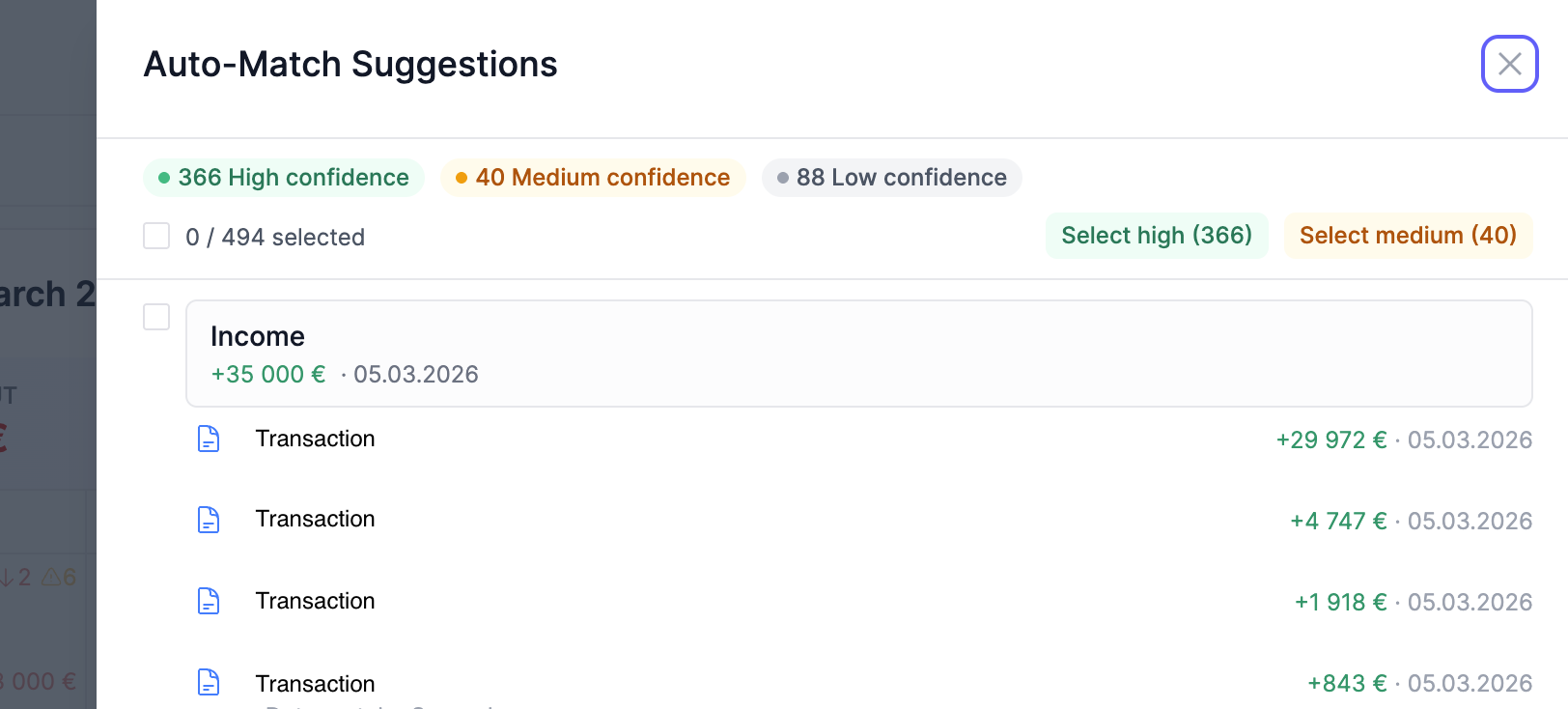
Every suggestion gets a confidence score: High (above 80%), Medium (50-80%), or Low (below 50%), displayed with color-coded badges. A budget tolerance prevents false matches — the engine won't link more than 150% of a projection's amount.
Here's the workflow:
- Click "Auto Match" — the engine analyzes all unlinked items
- The review panel shows results grouped by confidence: "47 High, 12 Medium, 3 Low"
- Each suggestion shows: the source item, the target projection, and the reasons ("Amount match 95%", "Date within 3 days", "Invoice reference match")
- Click "Select High Confidence" — 47 items selected instantly
- Review medium-confidence items individually — accept 8, skip 4
- Click "Apply" — 55 matches processed in seconds, batched in groups of 50
- The remaining 3 low-confidence items are flagged for manual review
"Automation doesn't mean blind trust. The best reconciliation systems give you confidence-based suggestions and let you approve in bulk — handling 90% automatically while flagging the 10% that need human judgment."
5. "Something Doesn't Add Up" — Catching Problems Before They Become Crises
The most dangerous cashflow problems are the ones you don't know about. An invoice that was never planned. A payment that came in but doesn't match anything. A client who quietly stopped paying. By the time these show up in your monthly review, you've lost weeks of response time.
BinarBase uses attention indicators — amber badges on each calendar day — to surface exactly two types of problems:
- Unplanned invoices — you billed something (or were billed for something) that you didn't forecast. Revenue or costs you didn't expect.
- Unmatched transactions — money moved in your bank account with no corresponding projection. Something happened that you didn't plan for.
A period summary at the top shows the total: "5 unplanned invoices, 3 unmatched transactions" for whatever month you're viewing. No digging required.
Here's how you work through them:
- Open the calendar — March shows amber attention badges on the 8th and 14th
- Click March 8th — the Invoices tab shows "3 unplanned" invoices you issued but never created projections for
- Click March 14th — the Transactions tab shows "2 unmatched" bank movements with no linked projection
- For unplanned invoices: create projections directly from them — the system pre-fills title, amount, and date
- For unmatched transactions: match them to existing projections, or investigate what happened
The sideover detail panel has tabs for Projections, Invoices, and Transactions, with a "Show Linked" toggle that filters down to only unlinked items. Global search lets you find any projection, invoice, or transaction instantly — even with diacritics in the name.
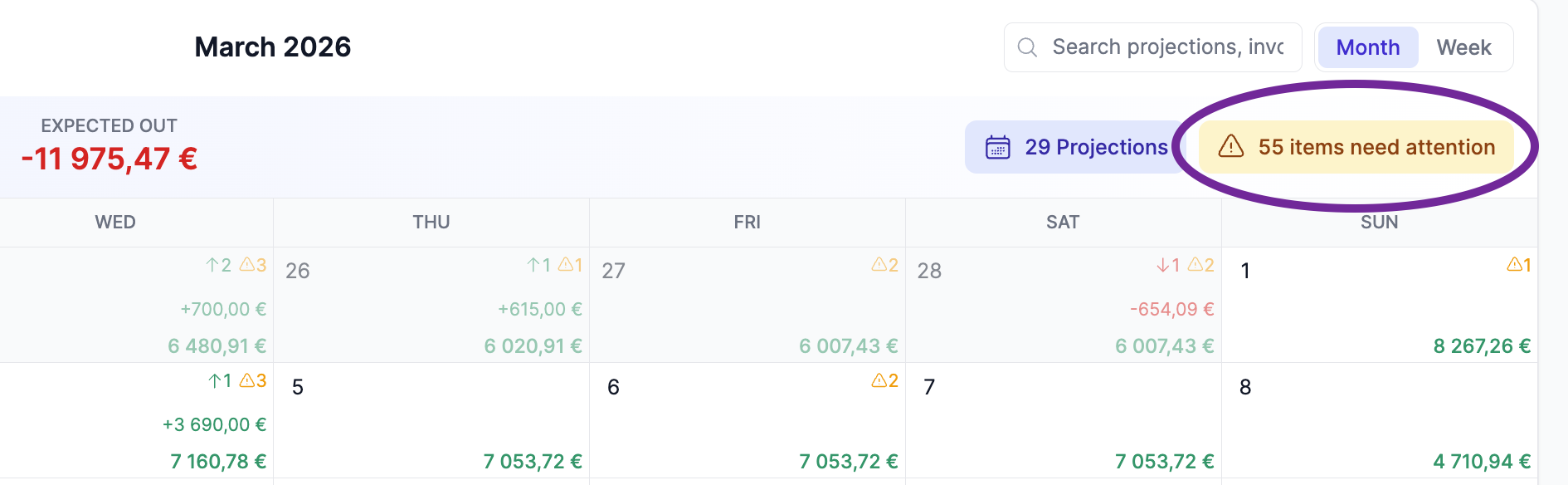
"In cashflow management, the absence of information is more dangerous than bad numbers. A system that actively flags what's unplanned and unmatched turns your blind spots into action items — before they become crises."
The Compound Effect
Each scenario solves one problem. Together, they transform how your finance operation works:
- Scenario 1 gives you clarity — your real cash position, not a bank balance illusion
- Scenario 2 gives you control — every invoice connected to every payment
- Scenario 3 gives you efficiency — forecasts that maintain themselves
- Scenario 4 gives you time — hours of reconciliation reduced to minutes
- Scenario 5 gives you early warning — problems surfaced before they compound
Together, they shift your finance operation from reactive (checking what happened) to proactive (preventing what could go wrong).
The Old Way
Check bank balance → Export invoices → Build spreadsheet forecast → Manually match transactions → Discover problems at month-end
The New Way
Open cashflow calendar → See real position → Auto-match in bulk → Act on attention items → Prevent problems before they start
Ready to see your real cash position?
BinarBase's Cashflow Planning module connects your invoices, bank transactions, and projections into one living view. Set it up in minutes.
Start Free